Play Store APK Download: How to Safely Download and Install Android Apps
If you are searching for play store APK download options, you may be wondering how APK files work, where they come from, and whether downloading an Android app outside the Google Play Store is safe. APK files can be useful when an app is unavailable in your country, a particular version is no longer listed, or you need to install an application manually.
However, not every APK download is trustworthy. A modified, outdated, or malicious APK can create security and privacy problems. That is why it is important to understand the difference between getting an app directly from Google Play and downloading its APK file from another source.
In this guide, we will explain what a Play Store APK is, how APK downloads work, when they can be useful, how to check an APK before installation, and what precautions you should take. Whether you are new to Android or regularly install apps manually, these tips can help you make better decisions.
What Is a Play Store APK?
APK stands for Android Package Kit. It is the file format Android uses to distribute and install applications. When you install an Android application, the operating system installs the package containing the app’s code, resources, and other required components.
The Google Play Store normally handles the downloading and installation process automatically. You generally do not need to find an APK file yourself.
The phrase play store APK download is commonly used by people looking for the APK version of an app that is normally distributed through Google Play. In practice, an APK obtained from a third-party website is not necessarily an official Google Play download.
This distinction matters because the safety of an APK depends heavily on its source and whether the file has been altered.
Why Do People Download APK Files?
For most users, installing apps through Google Play is the simplest option. There are nevertheless several reasons someone may look for an APK.
An App Is Not Available in Your Region
Some applications are released only in certain countries. If an app is unavailable in your region, a user may search for its APK.
Regional availability can change over time, so an app that cannot be installed today may become available later.
Installing an Older Version
An application update can sometimes introduce compatibility issues, remove a feature, or change the interface. Some users therefore look for an earlier version.
Older APKs should be treated carefully, however. Running an outdated application can expose a device to security vulnerabilities or compatibility problems.
The Device Cannot Access Google Play
Some Android devices do not include Google Play Services or the Play Store. In such cases, users may need another legitimate method of obtaining compatible applications.
Before installing an APK on such a device, it is important to confirm that the application actually supports the device’s Android version and processor architecture.
Testing and Troubleshooting
Developers, testers, and advanced Android users may install APK files manually when testing different versions of an application.
For ordinary users, however, manually installing an APK should not be necessary unless there is a specific reason to do so.

Google Play Store vs. Third-Party APK Download
Understanding the difference between these two methods is important.
| Feature | Google Play Store | Third-Party APK |
|---|---|---|
| Installation | Mostly automatic | Usually manual |
| Source verification | Google Play provides app distribution controls | Depends on the website |
| Updates | Usually automatic | Often manual |
| Security | Built-in protections and scanning | Depends on the downloaded file |
| Regional availability | May be restricted | Some files may be accessible elsewhere |
| Risk level | Generally lower | Varies significantly |
| Convenience | Very high | Requires additional steps |
The Google Play Store is generally the preferred option because it provides a controlled distribution system and integrates with Android’s security features.
A third-party APK can be legitimate, but you need to take additional steps to establish that the file is trustworthy.
How to Safely Find a Play Store APK Download
If you need an APK, do not simply choose the first download result you see in a search engine.
Start by identifying the official developer of the application. Check the developer’s website to see whether it provides an official APK or an alternative download method.
When evaluating an APK source, consider the following:
- Is the developer clearly identified?
- Does the website have a good reputation?
- Does the APK correspond to the official application?
- Is the version number clearly displayed?
- Is the download page filled with misleading advertisements or fake buttons?
- Does the file require unusual permissions?
- Is the APK modified or labeled as a mod?
- Does the website provide information about the package and version?
Avoid websites that make exaggerated claims such as “100% premium unlocked” or “all paid features free” when those claims involve unauthorized modifications.
Check the APK Before Installing It
Downloading an APK is only one part of the process. You should also inspect the file before opening it.
Check the File Name and Version
Make sure the application name, version, and package information make sense.
A strangely named file, an unexpected version number, or a file claiming to be a popular application from an unknown developer should raise concerns.
Verify the Developer
Look for the developer’s official name and compare it with information available through legitimate sources.
A popular app may have many copycat versions online. The app’s icon and name alone are not enough to prove authenticity.
Scan the File
Security software can help detect known malicious files. You can also use a reputable online malware-scanning service where appropriate.
Scanning is not an absolute guarantee that a file is safe, but it can provide another useful layer of protection.
Review Permissions
Think about whether the requested permissions make sense.
For example, a simple calculator application requesting access to contacts, SMS messages, microphone, and other sensitive information deserves closer examination.
Permissions alone do not prove that an APK is malicious, but unusual permission requests are a useful warning sign.
How to Install an APK on Android
Android versions and manufacturer interfaces vary, so the exact steps may look slightly different on your device.
A typical installation process looks like this:
- Download the APK from a source you trust.
- Locate the APK in your Downloads folder or file manager.
- Tap the APK file.
- If Android asks for permission to install from that source, review the setting carefully.
- Allow installation only if you trust the source and understand the risks.
- Follow the on-screen installation instructions.
- After installation, review the application’s permissions.
- Disable installation permission for the source afterward if you do not need it again.
Do not enable installation from unknown sources permanently just for convenience. Keeping unnecessary installation permissions enabled can increase the risk of accidentally installing an unsafe application.
Common Problems With APK Installation
An APK may fail to install even when the file itself is legitimate.
Some common causes include:
- The APK requires a newer Android version.
- The APK is designed for a different processor architecture.
- The APK is corrupted.
- The application is already installed with an incompatible signature.
- There is insufficient storage space.
- The APK requires additional split packages.
- The application is incompatible with the device.
- Android security settings are preventing installation.
If an APK does not install, avoid repeatedly downloading random versions from different websites. First determine the actual cause of the problem.
What Are Split APKs?
Modern Android applications can sometimes be distributed using multiple package components rather than one traditional APK file.
You may encounter formats or packages associated with split APKs, such as an application base package combined with architecture, language, or screen-density components.
This can make manual installation more complicated.
A file that appears to be the correct application may not contain everything required for your specific device. This is one reason downloading through Google Play is usually easier for everyday users.
Are APK Downloads Safe?
An APK file itself is not inherently dangerous. It is simply an Android application package.
The main concern is where the file came from and whether it has been modified.
A legitimate APK obtained directly from a reputable developer can be perfectly reasonable in some situations. On the other hand, a modified APK from an unknown source could contain malware, spyware, aggressive advertising components, or other unwanted software.
You should be particularly cautious with APKs promising:
- Paid applications for free
- Unlimited premium features
- Cheats or hacks
- Modified games
- Free subscriptions
- Removed security restrictions
- Unlimited in-app purchases
These types of files may be modified specifically to bypass the application’s normal protections.
How to Reduce the Risks of APK Downloads
If you regularly use APK files, develop a simple safety routine.
1. Prefer official sources.
If the developer offers the application directly, that is generally the best alternative to an unknown download site.
2. Keep Android updated.
Security updates can protect your device against known vulnerabilities.
3. Keep Google Play Protect enabled.
Android’s built-in security features can provide additional protection.
4. Avoid unnecessary modified APKs.
A modified application carries additional uncertainty because its original contents may have been changed.
5. Check application permissions.
Be suspicious of permissions that do not appear relevant to the application’s purpose.
6. Delete suspicious files.
If an APK behaves strangely, do not continue using it simply because it installed successfully.
7. Back up important data.
Regular backups can reduce the impact of unexpected software problems.
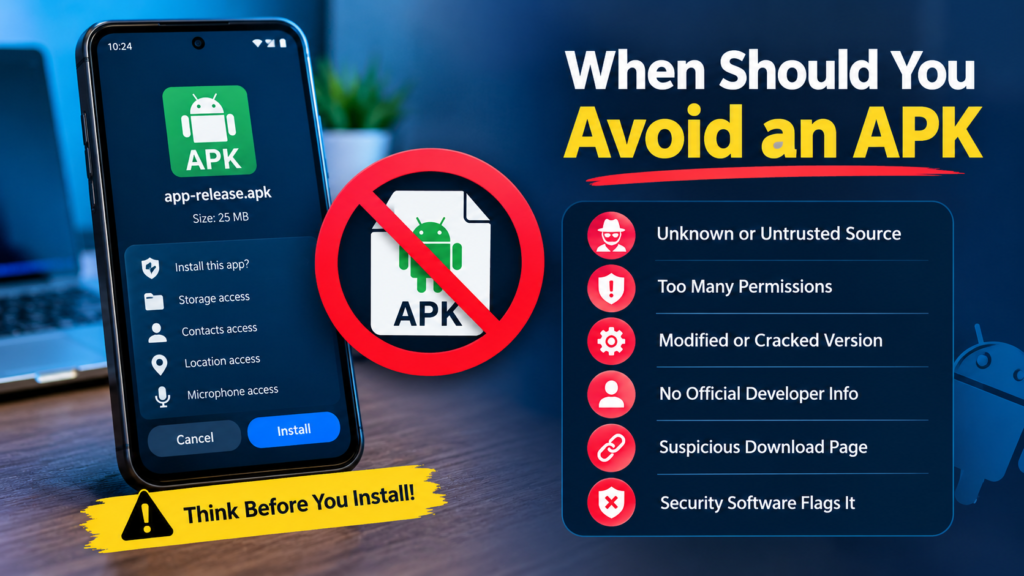
When Should You Avoid an APK?
Sometimes the safest choice is simply not to install the file.
Avoid an APK when:
- You cannot identify the developer.
- The download source looks suspicious.
- The file has been heavily modified.
- Security software detects a threat.
- The application requests excessive permissions.
- The download page uses deceptive buttons or redirects.
- The file is significantly different from the official version.
- The app promises unrealistic features.
- You cannot determine which version you are downloading.
If something about the download feels wrong, there is usually no reason to take the risk.
Frequently Asked Questions
Is a Play Store APK the same as an app downloaded from Google Play?
Not necessarily. An APK is the package used to install an Android application, while Google Play is a distribution platform that manages downloads, updates, compatibility, and security checks. A third-party APK may or may not be identical to the version distributed through Google Play.
Can I download an APK directly from Google Play?
Google Play normally handles application installation through its own interface rather than presenting users with a simple APK download button. If you specifically need an APK, you should look for an official developer-provided download or another trustworthy source.
Is downloading APK files illegal?
Downloading an APK is not automatically illegal. The legal situation depends on the application, source, copyright, licensing terms, and what the APK contains. Downloading unauthorized copies of paid software or copyrighted material can create legal issues.
Why won’t an APK install on my Android phone?
There are many possible reasons. The APK could require a newer Android version, use an incompatible processor architecture, be corrupted, conflict with an existing installation, or require additional package components.
Are modified APKs safe?
Modified APKs deserve extra caution because their original software may have been changed. Even when a website claims that a modified APK is safe, you cannot automatically assume that the modifications are harmless.
Should I use the Play Store instead of APK downloads?
For most users, yes. Google Play is generally the easiest and safer way to install Android applications. Manual APK installation is better reserved for situations where there is a legitimate reason to use it and you can verify the source.
Final Thoughts
Searching for a play store APK download can be useful when you need an Android application that is unavailable through your normal Play Store experience. However, the most important factor is not simply finding an APK—it is finding a trustworthy and compatible one.
Whenever possible, use Google Play or an official developer source. If you need to install an APK manually, verify the developer, check the version, scan the file, review permissions, and make sure it is compatible with your Android device.
Also Read: How to Check APK CPU Architecture on Android: A Complete Guide












1 comment