APKPure: A Complete Guide to Downloading Android Apps Safely
APKPure is a well-known third-party platform that Android users can explore when looking for apps, games, and APK files outside the Google Play Store. It attracts users who want to find particular app versions, access app listings that may not appear in their local store, or learn more about Android application packages.
However, downloading an app from a third-party source requires more care than installing one through an official app store. Users should understand how APK files work, how to check compatibility, and what security precautions to take before installing anything on their devices.
In this guide, we explain what APKPure is, how it works, its main features, its potential advantages and disadvantages, and the precautions worth taking before downloading an application. Whether you are new to APK files or already familiar with Android installation methods, this overview will help you make a more informed decision.
What Is APKPure?
APKPure is a third-party Android app distribution platform that provides access to app and game listings, including downloadable Android application packages. It is commonly associated with APK files, which are the installation packages used by Android applications.
Normally, Android users download apps through the Google Play Store. APKPure offers an alternative route for finding certain Android applications and versions. This can be useful when a user is researching an app, looking for a compatible release, or trying to understand why an application is unavailable through their usual store.
It is important to distinguish APKPure from the Google Play Store. They are separate platforms, and an application downloaded from a third-party source does not automatically receive the same distribution checks or update experience as one installed through Google Play.
APKPure should therefore be treated as an alternative source that requires careful evaluation, rather than a guarantee that every listed file is safe.
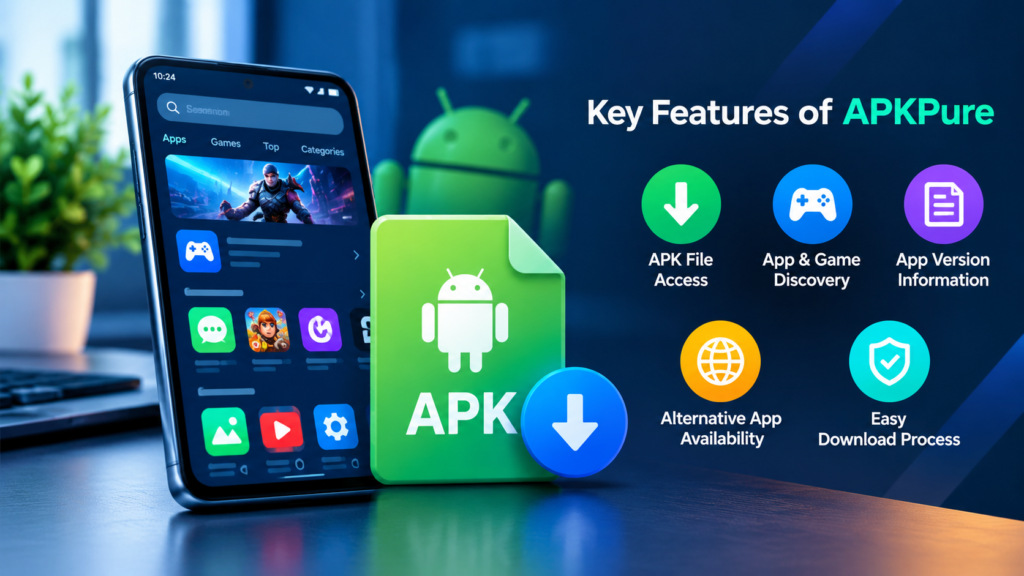
Key Features of APKPure
APKPure offers several features that appeal to Android users. The exact options available may vary depending on the website, application version, region, and the file being downloaded.
1. Access to APK Files
One of the main reasons people search for APKPure is to find Android installation files. An APK allows Android to install an application without obtaining it directly from the Play Store.
This can be helpful in certain situations, such as when a user needs to investigate a specific app release or install an application on a compatible device using a trusted installation package.
However, downloading an APK does not guarantee that it will work on every Android phone. Compatibility depends on the Android version, device architecture, app requirements, and other technical factors.
2. App and Game Discovery
APKPure includes listings for different types of Android applications and games. Users can browse categories, search for particular titles, and explore available app information.
Depending on the listing, useful details may include the app version, file size, release information, screenshots, and compatibility requirements.
Reviewing these details before downloading can help users avoid selecting an unsuitable version.
3. Information About App Versions
Some users look for an earlier version of an app because a newer release behaves differently on their device. Version information can help them identify the release they are researching.
Nevertheless, older versions may contain security vulnerabilities, missing features, or compatibility problems. Installing an earlier release is not always the best solution to an app-related issue.
4. Alternative App Availability
An app may not appear in a user’s usual store because of regional restrictions, device incompatibility, developer distribution choices, or other reasons.
A third-party platform may list the application, but availability does not mean that every restriction can be bypassed safely or legitimately. Some apps require a supported device, a particular account, or additional services before they can function.
Users should also check whether the developer offers an official download option.
How to Download Apps From APKPure
Before downloading anything, make sure you are using the correct APKPure website and not a look-alike page. Avoid links from unsolicited messages, unfamiliar advertisements, or suspicious download portals.
Follow these general steps when considering an APK download.
- Find the correct website. Check the website address carefully and avoid misleading domains or unexpected redirects.
- Search for the application. Enter the exact app name and compare the listing with information from the original developer.
- Review the version details. Check the release information, Android requirements, package details, and file size when available.
- Evaluate the source. Look for signs that the file corresponds to the intended application. A familiar app name or icon alone does not prove authenticity.
- Download the file only if you trust the source. Do not proceed if the page displays suspicious redirects, unexpected executable files, or misleading download buttons.
- Scan and inspect the downloaded file. Use reputable security tools where available, while remembering that a clean scan cannot guarantee complete safety.
- Review Android’s installation warning. Android may require permission to install apps from a particular source. Granting that permission should be a deliberate choice, not an automatic step.
- Check the app after installation. Review its requested permissions and watch for unexpected behaviour.
If the app is available through Google Play or the developer’s official website, those sources are generally preferable because they provide a more direct way to verify the application’s origin.
Is APKPure Safe to Use?
APKPure is a third-party distribution platform, so users should assess the individual download rather than assume that every file is safe. No third-party repository can eliminate every risk associated with modified, compromised, outdated, or incorrectly identified application files.
A legitimate-looking listing may still require additional verification. Similarly, a security scanner that reports no threat cannot prove that a file is harmless in every situation.
Before installing an APK, consider these precautions:
- Verify the website address and avoid imitation websites.
- Compare the application name, developer, package identifier, and release details with reliable information.
- Prefer original, unmodified application files over unofficial modified versions.
- Check the file using a reputable mobile security tool when possible.
- Keep Android, Google Play Protect, and other relevant security protections enabled.
- Review requested permissions, particularly access to SMS, contacts, accessibility services, microphone, and location.
- Avoid APK files that request unrelated permissions or ask you to disable essential security protections.
- Never enter passwords, payment details, or verification codes into an unexpected screen after installing an unfamiliar app.
Remember that APK installation is not inherently malicious. The risk comes from the trustworthiness of the source, the integrity of the file, and the permissions or behaviour of the application.
APKPure vs. Google Play Store
Both platforms can help users find Android applications, but they differ in how users obtain and manage their downloads.
| Feature | APKPure | Google Play Store |
|---|---|---|
| Distribution method | Third-party app distribution | Official Android app marketplace for supported devices |
| APK file access | Focuses on APK downloads and related packages | Primarily installs apps through the store |
| App updates | May depend on the platform and installation method | Integrated update management for supported apps |
| Developer verification | Requires users to assess the source and listing | Uses Play Console publishing and platform review processes |
| Security protections | Depends on the source, file, and device safeguards | Includes Google Play Protect and other platform protections |
| Compatibility | Depends on the available package and device requirements | Checks compatibility and availability for the device and region |
| Best starting point | Users researching alternative app distribution | Most users seeking a straightforward installation experience |
Neither a familiar brand name nor a platform’s security features should replace careful evaluation. Google Play also cannot guarantee that every app is free of problems, but it is generally the recommended starting point for downloading Android apps.
What Is the Difference Between APK and XAPK?
When exploring APKPure or other third-party Android sources, you may encounter both APK and XAPK files. Understanding the difference can help you avoid installation errors.
APK is the standard Android application package format. It contains application components required for installation, although some apps may need additional files or separate packages.
XAPK is a distribution format used by some third-party platforms to bundle an APK with additional resources, such as expansion data or related installation files. It is not the standard Android package format handled directly in the same way as a regular APK.
A device may not install an XAPK file simply by tapping it. A compatible installer or another supported installation method may be necessary.
| File type | What it generally contains | Important consideration |
|---|---|---|
| APK | An Android application package | Must meet device and Android requirements |
| XAPK | An APK and potentially additional app resources | May need a compatible installation method |
| Split APK packages | Multiple related packages for one application | Required splits must be installed together |
Do not rename an unfamiliar file extension and assume that this will make the file installable. Always confirm the format and use a trustworthy installation method.
Common APKPure Problems and How to Fix Them
Even when a download comes from a source you trust, installation problems can occur. Many issues relate to the device rather than the distribution platform itself.
APK Won’t Install
An APK may fail to install because it requires a newer Android version, is incompatible with the device architecture, or conflicts with an existing installation.
Check the app’s minimum Android requirement and confirm that the downloaded file matches your device. If the app is already installed, a signing-certificate mismatch may prevent an update.
App Keeps Crashing
An app can install successfully but still crash when opened. This may happen because of missing dependencies, unsupported device features, an incompatible release, or a software bug.
Restart the phone, update Android where appropriate, and check whether the developer supports your device. If the problem continues, uninstalling the problematic app may be safer than repeatedly trying unknown versions.
Download Is Incomplete
An interrupted download or damaged file can prevent installation. Compare the file size with the information provided by a trustworthy source and download it again only after confirming the source is legitimate.
If a cryptographic checksum is available from the developer, compare it with the downloaded file. A matching checksum can help verify file integrity, although it only establishes authenticity when the reference checksum itself comes from a trusted source.
Android Blocks the Installation
Android may block an installation because the source has not been authorized, a security feature identifies a potential threat, or the app violates a device restriction.
Do not immediately disable security features to force installation. First, understand the warning and verify the application. If Android or your security software identifies a serious risk, avoid proceeding unless you can establish a reliable explanation for the alert.
Advantages and Disadvantages of APKPure
APKPure may be useful in specific situations, but its benefits should be weighed against the additional responsibility involved in installing applications from third-party sources.
Advantages
- Provides another place to explore Android applications and games.
- May offer access to certain app versions not readily visible in a user’s usual store.
- Can help users research release information and package requirements.
- Gives technically experienced users another distribution option.
Disadvantages
- Requires extra attention to file authenticity and website legitimacy.
- Third-party downloads may involve additional installation steps.
- Some applications may be outdated, incompatible, or unavailable for a particular device.
- Users may not receive updates through the same process used by their original app store.
- Modified or compromised files can expose devices and personal information to security risks.
The practical choice depends on the application and your reason for downloading it. If an official store provides the version you need, using it is usually simpler and safer.
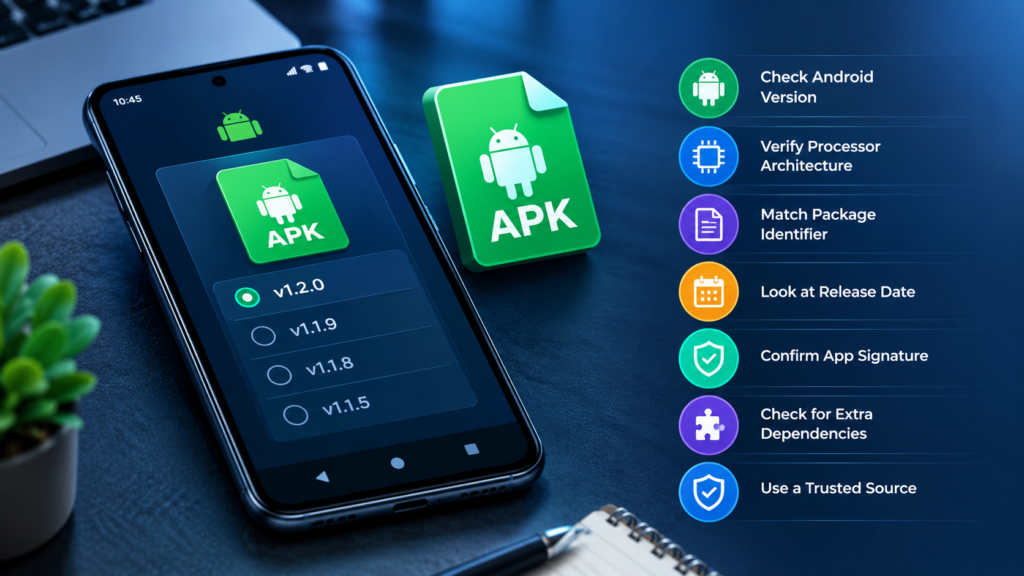
Tips for Choosing the Right APK Version
Choosing the wrong version can lead to installation failures, unexpected crashes, or missing functionality. Before downloading an APK, check the following details:
- Android version: Confirm that your operating system meets the application’s minimum requirements.
- Processor architecture: Determine whether the package supports your device’s CPU architecture, such as ARM64.
- Package identifier: Check that the application package corresponds to the intended app.
- Release date: Avoid old releases unless there is a specific reason to use one and you understand the security implications.
- App signature: Where reliable reference information is available, verify that the application’s signing certificate is consistent with the legitimate developer’s release.
- Additional dependencies: Check whether the app requires extra packages, particular services, or specific hardware.
- Source reliability: Prefer the developer’s official distribution channel whenever possible.
These checks are especially useful when an APK installs on one phone but fails on another. Two Android devices can run different operating system versions, use different processors, and have different hardware capabilities.
Protecting Your Personal Information
Installing an app is not just a technical decision. It can also affect your privacy, accounts, and stored information.
Before granting access, ask whether each permission makes sense for the app’s purpose. A navigation application may reasonably need location access, while a simple wallpaper application generally should not need access to SMS messages.
Use a unique password for important accounts and enable two-factor authentication where supported. Avoid installing applications that ask you to enter sensitive credentials into unfamiliar login screens.
If an app behaves suspiciously after installation, revoke unnecessary permissions, disconnect sensitive accounts if appropriate, and remove the app. Run a security scan and change passwords from a trusted device if you suspect that your credentials have been exposed.
For work devices or phones containing sensitive information, follow your organization’s software installation policies instead of relying on an unofficial source.
Frequently Asked Questions About APKPure
1. What is APKPure used for?
APKPure is a third-party platform for discovering Android apps and games and accessing certain APK files. People may use it to research app versions or explore applications that are not available through their usual store. Each download should be checked for authenticity and compatibility.
2. Is APKPure safe for Android phones?
Safety depends on the specific website, downloaded file, and installation process. APKPure should not be treated as a guarantee that every file is harmless. Verify the source, inspect app permissions, use security protections, and prefer official developer downloads whenever possible.
3. Can I download APKPure apps without Google Play?
Yes, an Android application package can generally be installed without downloading it through Google Play, provided the device supports the package and allows the installation. However, users should carefully verify the source and understand the security implications before proceeding.
4. What is the difference between APKPure and Google Play?
APKPure is a third-party distribution platform, whereas Google Play is Google’s app marketplace. Their distribution methods, update processes, and security controls differ. Google Play is generally the better starting point for most users because installation and updates are integrated into the Android ecosystem.
5. Why won’t an APKPure APK install on my phone?
Common reasons include an incompatible Android version, unsupported processor architecture, a corrupted download, missing split packages, insufficient storage, or a signature conflict with an existing app. Check the requirements and error message before attempting another installation.
6. Does APKPure automatically update installed apps?
Update behaviour depends on how the app was installed and which distribution or update tools are available. Do not assume that an app downloaded from a third-party platform will receive updates through Google Play. Check the app’s update source and obtain future releases only from a source you trust.
Final Thoughts
APKPure is an alternative platform for exploring Android apps, games, and APK files. It may be useful when researching particular releases or looking for another distribution option, but downloading an application outside an official store calls for additional care.
Before installing anything, verify the source, check Android and processor compatibility, inspect permissions, and pay attention to security warnings. An APK that installs successfully is not necessarily authentic or safe.
Also Read: How APK Signatures Work: A Complete Guide to Android App Security













Post Comment